Joining a session
Pair programming relies on two or more users.
As long as only one user is online, there isn't much pair programming to do.
As soon as another user connects, things brighten up.
Another user starts Eclipse
Assume the new users begin from a clean state. Essentially, they will repeat
all the steps for setting up an account, just like the first user.
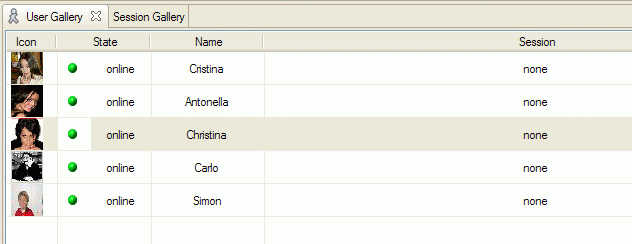
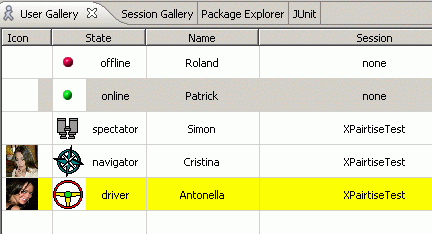
The user's workbench User Gallery shows the connected users.
Joining a session
The user can now select a session to join. If several sessions have been created, they show up in the
session gallery. Highlight the session you wish to join. Every users sees the available topics and
their associated shared projects in his Session Gallery. Assume one user starts to join a session.
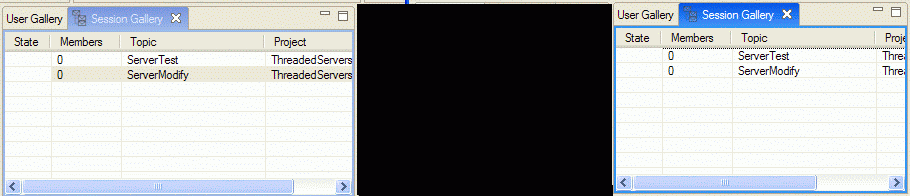
He has two options to join the session. By selecting Join Session he can join the session without
selecting a preferred role. This way, a role will be assigned automatically depenging on who is already in the
session. Or he can request a preferred role by using the Join As submenu.

While joining the session, he will be prompted for an optional backup of each project shared in the session.
Depending on the project size and type, the speed and workload of your computer and the associated network,
the joining operation may take some time. If one of the needed projects does not exist yet in the user's
workspace, it will automatically be fetched either from the XPairtise server or a version control
repository, depending on the type of the project.

If you selected to create backups while joining, the plug-in creates zip-snapshots
of the respective projects. The zip-files are stored in the snapshots directory
in your home directory.
Inviting a user
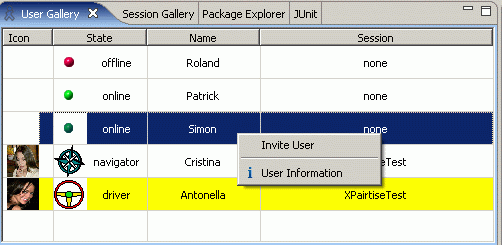
Given that a user is logged on, a user might decide on his own to join a session.
The driver or another participant may also invite a user by highlighting the user gallery entry and right-clicking.
The context Invite will pop up, giving him the possibility to invite the other user.
The other user's workbench will pop up an invitation message:
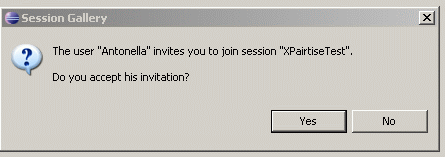
Upon accepting the invitation, the Session Galleries of all users will show one more
member for the session. The User Gallery view will update the symbols, showing
the role they assume.
Note that no user may join two sessions at the same time. If you try to, an error message
will pop up.